

The Vendor Lock-in Trap#
For the better part of the last decade, the industry narrative around IoT has been dominated by a “Cloud-First” mentality. The premise was seductive: treat your edge devices as dumb pipes and offload the heavy lifting to the cloud’s infinite compute.
However, as we moved from prototypes to production at scale, cracks began to appear in this facade. Latency mattered. Bandwidth costs exploded. But most importantly, we realized that by adopting managed edge runtimes, we were walking into a trap of architectural dependency.
This is the story of Keystone, an open-source project born from the necessity to reclaim control over the edge. It is a lightweight edge orchestration agent written in Go, designed to deploy and manage components on devices — processes by default, containers when needed — with the simplicity and freedom that solutions like AWS IoT Greengrass promised but failed to deliver.
AWS IoT Greengrass is an impressive piece of engineering, but it suffers from a critical flaw common to hyperscaler tools: it is designed to increase your consumption of their cloud.
When you build on Greengrass, you aren’t just writing code; you are adopting a proprietary mental model:
- Lambda-on-Edge: You are forced to package logic as AWS Lambda functions, coupling your business logic to AWS-specific signatures.
- IPC Dependency: Inter-process communication relies on proprietary Greengrass IPC, making your components non-portable.
- Opaque Runtime: The “Nucleus” (the Java-based core of Greengrass V2) is a resource-heavy black box. Debugging a memory leak in the JVM on a constrained device is not how I want to spend my weekends.
We needed a solution that treated the cloud as a destination, not a dependency.
The Philosophy: Edge Sovereignty#
Keystone is built on a divergent philosophy: the device is sovereign. It owns its component lifecycle, manages its own state, and keeps running regardless of connectivity. Cloud connectivity is a feature, not a requirement for operation. If the network goes down, Keystone keeps its components running, and pending deployment jobs queue up locally via JetStream until the connection recovers.
Where Greengrass tries to be a cloud runtime pushed to the edge, Keystone is a local-first orchestrator that optionally takes orders from the cloud.
Why Go?#
The decision to build Keystone in Go was strategic. Having architected systems in Java, Python, and C++, Go offered the perfect intersection of performance and developer experience for the edge.
The Power of the Static Binary#
Dependency management on embedded Linux is a nightmare. Python environments break with OS updates; Java requires a heavy JVM installation.
Go compiles to a single, static binary. We can drop the 21 MB Keystone executable onto a Raspberry Pi, a ruggedized industrial gateway, or a server, and it just works. No pip install, no JVM tuning, no missing shared libraries.
Concurrency is Native#
Edge orchestration is inherently asynchronous. An agent might be starting a process, monitoring health checks on three running components, downloading an artifact with resume, and processing a deployment command from NATS — all simultaneously.
Go’s Goroutines and Channels allow Keystone to handle all of this concurrently with a fraction of the memory footprint of a thread-based Java application.
| Metric | AWS Greengrass (Java) | Keystone (Go) |
|---|---|---|
| Idle RAM | ~100 MB+ | ~23 MB |
| Cold Boot | 8-15 seconds | < 0.5 seconds |
| Deployment | Complex artifact bundle | Single Binary |
Keystone Architecture#
Keystone follows a Ports and Adapters pattern. The core orchestration logic is completely decoupled from how you talk to the agent.
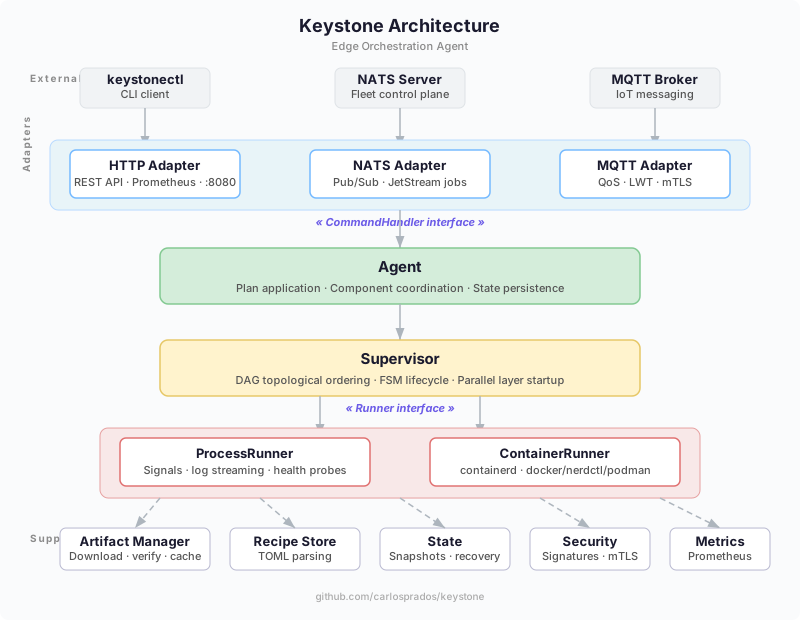
The Core: Recipes, Plans, and a Supervisor#
Instead of Lambda functions and proprietary IPC, Keystone uses simple TOML recipes to describe components, and deployment plans to declare the desired state of a device.
A recipe defines what to run and how to keep it healthy:
[metadata]
name = "com.example.api"
version = "1.0.0"

[[artifacts]]
uri = "https://artifacts.internal/api-server.tar.gz"
sha256 = "a1b2c3..."
unpack = true

[lifecycle.run.exec]
command = "./api-server"
args = ["--port", "9090"]

[lifecycle.run.health]
check = "http://127.0.0.1:9090/healthz"
interval = "10s"
A plan lists the components you want running. Apply it and Keystone resolves the dependency graph, starts components layer by layer in parallel, monitors their health, and restarts them according to their restart policy.
Under the hood, a Supervisor manages each component through a state machine (none → installing → starting → running → stopping → stopped/failed), building a DAG from declared dependencies and starting independent components in parallel:
// StartStack starts components respecting the dependency DAG.
func StartStack(ctx context.Context, comps []*Component) error {
    g := BuildGraph(comps)
    layers, err := g.TopoLayers()
    if err != nil {
        return err // cycle detected
    }
    for _, layer := range layers {
        var wg sync.WaitGroup
        errCh := make(chan error, len(layer))
        for _, name := range layer {
            comp := g.Nodes[name]
            wg.Add(1)
            go func(c *Component) {
                defer wg.Done()
                if err := c.Install(ctx); err != nil {
                    errCh <- err
                    return
                }
                if err := c.Start(ctx); err != nil {
                    errCh <- err
                }
            }(comp)
        }
        wg.Wait()
        // handle errors, rollback if needed...
    }
    return nil
}
Runners: Processes First, Containers When Needed#
By default, Keystone uses a ProcessRunner that spawns native processes with proper signal handling (process groups), log streaming, and health probes (HTTP, TCP, or shell command). When you need containers, a ContainerRunner uses containerd natively, with automatic fallback to Docker, nerdctl, or Podman CLI.
You choose per-recipe: set type = "container" in the lifecycle and Keystone handles image pulling, mounts, port mappings, and resource limits.
Control Plane Adapters: Your Cloud, Your Choice#
This is where we break the lock-in. The CommandHandler interface defines all operations the agent supports (apply plan, stop, restart, health). Each transport adapter just translates the wire protocol:
- HTTP: REST API for local management and Prometheus metrics (default).
- NATS: Pub/Sub with optional JetStream for durable, offline-capable job queues.
- MQTT: IoT-native messaging for AWS IoT Core, Mosquitto, EMQX, or any standard broker.
All three can run simultaneously. Switching from NATS to MQTT, or adding HTTP alongside either, is a matter of CLI flags — no code change, no recompile.
# HTTP + NATS + MQTT simultaneously
./keystone --http :8080 \
  --nats-url nats://nats.internal:4222 --nats-device-id edge-001 \
  --mqtt-broker tcp://mqtt.internal:1883 --mqtt-device-id edge-001
Conclusion: Freedom is an Architecture Choice#
We didn’t build Keystone to compete with AWS Greengrass’s feature set. We built it to compete with its philosophy.
By choosing Go, we gained performance and operational simplicity. By choosing pluggable adapters over cloud-native coupling, we gained the freedom to swap out underlying technologies as the market evolves. By choosing TOML recipes over proprietary deployment formats, we made edge orchestration something any team can understand in minutes.
If you are tired of the complexity of managed edge runtimes and want an agent that puts you back in the driver’s seat, check out the project on GitHub: carlosprados/keystone.